

Como añadir un video a los productos de Prestashop
En este artículo vamos a ver como añadir un video de Youtube a cada ficha del producto de Prestashop 1.5.x.
Es requerido tener conocimientos de programación orientada a objetos para llevar a cabo la tarea de añadir un nuevo campo personalizado, en este caso, a los productos del prestashp 1.5.x.
Lo primero que deberías hacer es sobreescribir la clase product añadiéndole el nuevo campo. Existen infinidad de campos extra para añadir al producto pero en el caso del ejemplo que vamos a ilustrar vamos a tratar de añadir un nuevo campo que va a representar el código que viene siempre en la URL de los videos de Youtube.
Necesitaremos incorporar la nueva variable de la clase:
public $video;
Y seguidamente la definición:
'video' => array('type' => self::TYPE_STRING, 'validate' => 'isReference', 'size' => 64),
En la definición le estamos indicando que queremos una variable de tipo cadena de longitud 64 caracteres y que además se valida igual que el campo referencia, mirando su longitud.
Todo esto que comento lo deberemos añadir a la clase que sobreescribe la clase Product del core de Prestashop. Lo puedes localizar en /override/classes/Product.php y donde tan solo deberás añadir el siguiente contenido:
<?php

class Product extends ProductCore
{
    public $video;

    public static $definition = array(
        'table' => 'product',
        'primary' => 'id_product',
        'multilang' => true,
        'multilang_shop' => true,
        'fields' => array(
            // Classic fields
            'id_shop_default' =>             array('type' => self::TYPE_INT, 'validate' => 'isUnsignedId'),
            'id_manufacturer' =>             array('type' => self::TYPE_INT, 'validate' => 'isUnsignedId'),
            'id_supplier' =>                 array('type' => self::TYPE_INT, 'validate' => 'isUnsignedId'),
            'reference' =>                     array('type' => self::TYPE_STRING, 'validate' => 'isReference', 'size' => 32),
            'supplier_reference' =>         array('type' => self::TYPE_STRING, 'validate' => 'isReference', 'size' => 32),
            'location' =>                     array('type' => self::TYPE_STRING, 'validate' => 'isReference', 'size' => 64),
            'video' =>                     array('type' => self::TYPE_STRING, 'validate' => 'isReference', 'size' => 64),
            'width' =>                         array('type' => self::TYPE_FLOAT, 'validate' => 'isUnsignedFloat'),
            'height' =>                     array('type' => self::TYPE_FLOAT, 'validate' => 'isUnsignedFloat'),
            'depth' =>                         array('type' => self::TYPE_FLOAT, 'validate' => 'isUnsignedFloat'),
            'weight' =>                     array('type' => self::TYPE_FLOAT, 'validate' => 'isUnsignedFloat'),
            'quantity_discount' =>             array('type' => self::TYPE_BOOL, 'validate' => 'isBool'),
            'ean13' =>                         array('type' => self::TYPE_STRING, 'validate' => 'isEan13', 'size' => 13),
            'upc' =>                         array('type' => self::TYPE_STRING, 'validate' => 'isUpc', 'size' => 12),
            'cache_is_pack' =>                 array('type' => self::TYPE_BOOL, 'validate' => 'isBool'),
            'cache_has_attachments' =>         array('type' => self::TYPE_BOOL, 'validate' => 'isBool'),
            'is_virtual' =>                 array('type' => self::TYPE_BOOL, 'validate' => 'isBool'),

            /* Shop fields */
            'id_category_default' =>         array('type' => self::TYPE_INT, 'shop' => true, 'validate' => 'isUnsignedId'),
            'id_tax_rules_group' =>         array('type' => self::TYPE_INT, 'shop' => true, 'validate' => 'isUnsignedId'),
            'on_sale' =>                     array('type' => self::TYPE_BOOL, 'shop' => true, 'validate' => 'isBool'),
            'online_only' =>                 array('type' => self::TYPE_BOOL, 'shop' => true, 'validate' => 'isBool'),
            'ecotax' =>                     array('type' => self::TYPE_FLOAT, 'shop' => true, 'validate' => 'isPrice'),
            'minimal_quantity' =>             array('type' => self::TYPE_INT, 'shop' => true, 'validate' => 'isUnsignedInt'),
            'price' =>                         array('type' => self::TYPE_FLOAT, 'shop' => true, 'validate' => 'isPrice', 'required' => true),
            'wholesale_price' =>             array('type' => self::TYPE_FLOAT, 'shop' => true, 'validate' => 'isPrice'),
            'unity' =>                         array('type' => self::TYPE_STRING, 'shop' => true, 'validate' => 'isString'),
            'unit_price_ratio' =>             array('type' => self::TYPE_FLOAT, 'shop' => true),
            'additional_shipping_cost' =>     array('type' => self::TYPE_FLOAT, 'shop' => true, 'validate' => 'isPrice'),
            'customizable' =>                 array('type' => self::TYPE_INT, 'shop' => true, 'validate' => 'isUnsignedInt'),
            'text_fields' =>                 array('type' => self::TYPE_INT, 'shop' => true, 'validate' => 'isUnsignedInt'),
            'uploadable_files' =>             array('type' => self::TYPE_INT, 'shop' => true, 'validate' => 'isUnsignedInt'),
            'active' =>                     array('type' => self::TYPE_BOOL, 'shop' => true, 'validate' => 'isBool'),
            'available_for_order' =>         array('type' => self::TYPE_BOOL, 'shop' => true, 'validate' => 'isBool'),
            'available_date' =>             array('type' => self::TYPE_DATE, 'shop' => true, 'validate' => 'isDateFormat'),
            'condition' =>                     array('type' => self::TYPE_STRING, 'shop' => true, 'validate' => 'isGenericName', 'values' => array('new', 'used', 'refurbished'), 'default' => 'new'),
            'show_price' =>                 array('type' => self::TYPE_BOOL, 'shop' => true, 'validate' => 'isBool'),
            'indexed' =>                     array('type' => self::TYPE_BOOL, 'shop' => true, 'validate' => 'isBool'),
            'visibility' =>                 array('type' => self::TYPE_STRING, 'shop' => true, 'validate' => 'isProductVisibility', 'values' => array('both', 'catalog', 'search', 'none'), 'default' => 'both'),
            'cache_default_attribute' =>     array('type' => self::TYPE_INT, 'shop' => true),
            'advanced_stock_management' =>     array('type' => self::TYPE_BOOL, 'shop' => true, 'validate' => 'isBool'),
            'date_add' =>                     array('type' => self::TYPE_DATE, 'shop' => true, 'validate' => 'isDateFormat'),
            'date_upd' =>                     array('type' => self::TYPE_DATE, 'shop' => true, 'validate' => 'isDateFormat'),

            /* Lang fields */
            'meta_description' =>             array('type' => self::TYPE_STRING, 'lang' => true, 'validate' => 'isGenericName', 'size' => 255),
            'meta_keywords' =>                 array('type' => self::TYPE_STRING, 'lang' => true, 'validate' => 'isGenericName', 'size' => 255),
            'meta_title' =>                 array('type' => self::TYPE_STRING, 'lang' => true, 'validate' => 'isGenericName', 'size' => 128),
            'link_rewrite' =>                 array('type' => self::TYPE_STRING, 'lang' => true, 'validate' => 'isLinkRewrite', 'required' => true, 'size' => 128),
            'name' =>                         array('type' => self::TYPE_STRING, 'lang' => true, 'validate' => 'isCatalogName', 'required' => true, 'size' => 128),
            'description' =>                 array('type' => self::TYPE_HTML, 'lang' => true, 'validate' => 'isString'),
            'description_short' =>             array('type' => self::TYPE_HTML, 'lang' => true, 'validate' => 'isString'),
            'available_now' =>                 array('type' => self::TYPE_STRING, 'lang' => true, 'validate' => 'isGenericName', 'size' => 255),
            'available_later' =>             array('type' => self::TYPE_STRING, 'lang' => true, 'validate' => 'IsGenericName', 'size' => 255),
        ),
        'associations' => array(
            'manufacturer' =>                 array('type' => self::HAS_ONE),
            'supplier' =>                     array('type' => self::HAS_ONE),
            'default_category' =>             array('type' => self::HAS_ONE, 'field' => 'id_category_default', 'object' => 'Category'),
            'tax_rules_group' =>             array('type' => self::HAS_ONE),
            'categories' =>                    array('type' => self::HAS_MANY, 'field' => 'id_category', 'object' => 'Category', 'association' => 'category_product'),
            'stock_availables' =>            array('type' => self::HAS_MANY, 'field' => 'id_stock_available', 'object' => 'StockAvailable', 'association' => 'stock_availables'),
        ),
    );
}
Donde tan solo estamos añadiendo la nueva variable de la clase y dando su definición. Guardamos y subimos al servidor.
Utilizando un programa de administración de base de datos, deberemos acceder a la base de datos para crear una nueva tupla dentro de la tabla «ps_product». En el caso del ejemplo, la vamos a llamar «video» y será de tipo varchar(64).
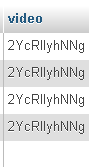
Ahora tocaría añadir el campo de texto que para añadir el código de cada video de los productos en el backend de la tienda. Deberemos localizar el fichero que se encuentra dentro de la siguiente ruta dentro de la administración:
adminxxx/themes/default/template/controllers/products/informations.tpl
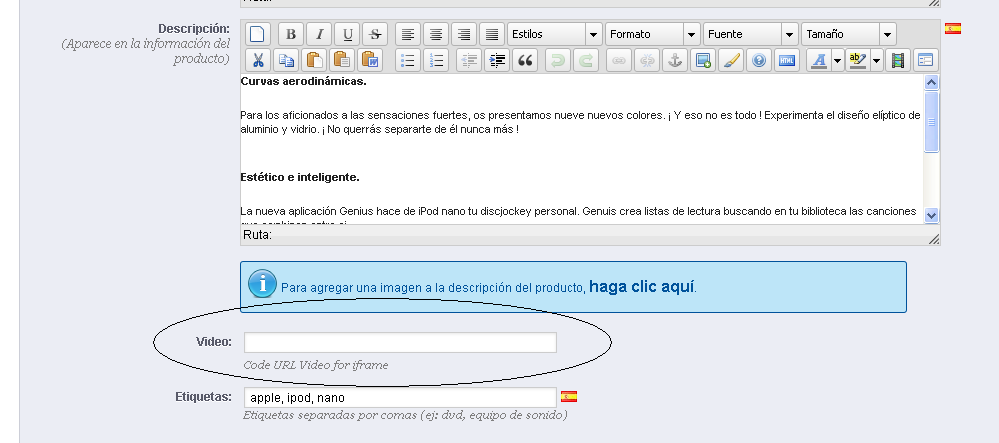
Nos daremos cuenta que no es más que la plantilla de formulario de la ficha del producto. Entonces, allí donde deseemos añadiremos el nuevo campo. Deberás estar familarizado con las tablas HTML para añadirlo de forma correcta. En el caso del ejemplo lo vamos a situar por encima del campo Etiquetas con el siguiente código:
<table>
   <tr>
      <td class="col-left"><label>{l s='Video:'}</label></td>
      <td style="padding-bottom:5px;" class="">
         <input size="55" type="text" id="video" name="video" value="{$product->video}" />
         <p class="preference_description clear">{l s='Code URL Video for iframe'}</p>
       </td>
    </tr>
</table>
Obteniendo como resultado:
La parte más complicada ya está hecha. Ahora solo falta ir a la plantilla que estés utilizando en tu tienda y añadir en el product.tpl allí donde lo desees el iframe que contendrá el video utilizando la variable que hemos creado.
{if $product->video}
    <iframe width="321" height="190" src="//www.youtube.com/embed/{$product->video}" frameborder="0" allowfullscreen></iframe>
{/if}
En el caso del ejemplo que ilustramos, tan solo vamos a mostrar el valor de la variable en el caso de que tenga información.
Si te ha servido este tutorial hazte fan de la página de facebook del blog Jose Aguilar
Autor
¿Buscas trabajo de programador?






Deja una respuesta